
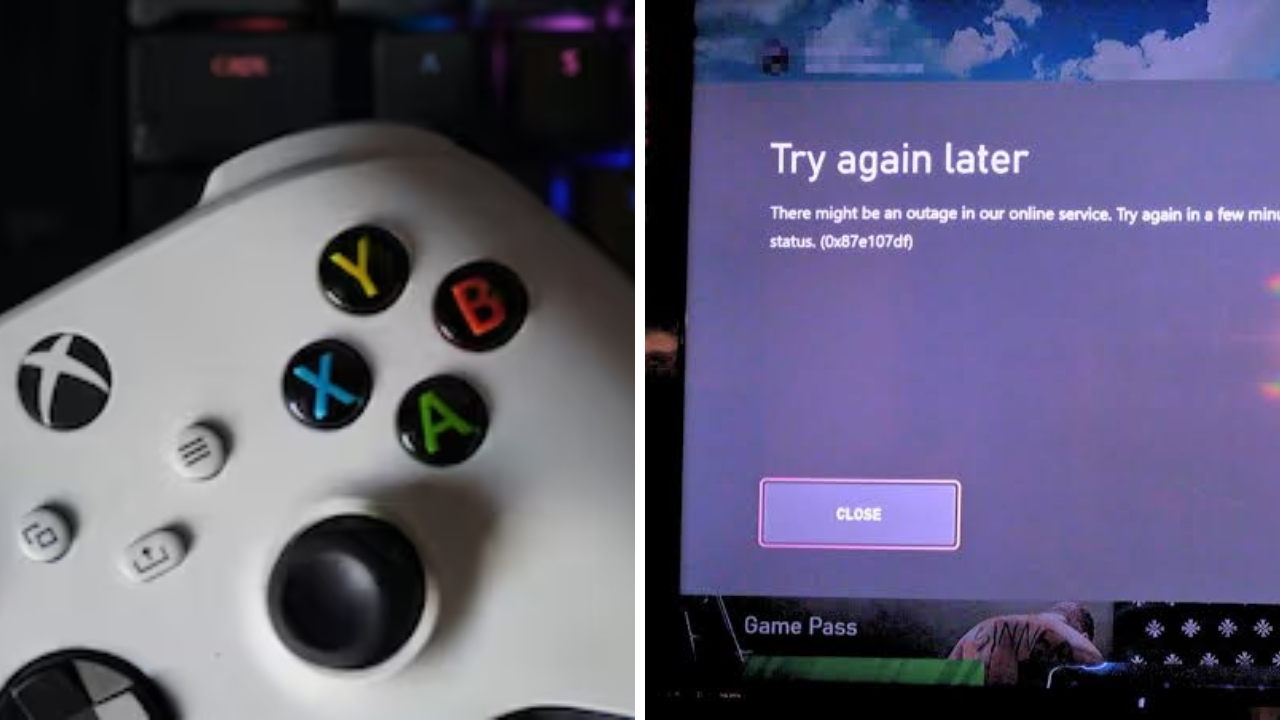
Xbox users are reporting issues logging in to online services, with the 0x87e107df error appearing amid what seems to be a widespread service outage. The issue has prevented some users from signing in, launching digital games or accessing Xbox Network features, frustrating the gaming community.
Xbox servers down news today spread like wildfire on social media and community forums as gamers reported connectivity issues on Xbox consoles and PC. There are plenty of reasons why services might be interrupted, but to learn more about any outage and the recovery efforts currently underway, users should go to official Xbox channels.
What does Error 0x87e107df mean?
Error 0x87e107df usually means there are issues with Xbox Network services. With this error, gamers may not be able to sign-in to their Microsoft account, verify ownership of digital games or connect to online services.
Certain Xbox games may ask you to verify your account before you can begin playing. You might also be facing a temporary outage on Xbox’s end that’s keeping you from playing digital titles you already own.
For most people, the problem is not the player’s console or Internet connection, but Xbox’s online infrastructure.
Players are having login issues everywhere
As the outage reports kept coming in, numerous users reported that they couldn’t sign in to Xbox Network or were facing authentication failures. Some said there were outages for cloud gaming, multiplayer matchmaking and digital purchases.
Players also discovered that some installed digital titles would not load because the system was unable to verify licenses during outages of Xbox services.
The number of reports was staggering, and the disruption was affecting more than just one local network.
Microsoft May Bring Back Services Gradually
Large online services typically have a phased approach to outages. Account sign-in and other services may return ahead of multiplayer gaming, cloud saves or the full functionality of the Microsoft Store.
Depending on the region and Xbox service a player uses, some players might return to the game at different speeds during recovery.
In the meantime things are not quite back to normal and you may still see the odd error from time to time.
What players can do while waiting
If the outage is on the server side, rebooting your console or reinstalling games probably won’t do much good right away. Players should instead check the official Xbox Status page for live information on affected services.
If the services come back, you might want to log out of the console and log back in to refresh the account authentication. You might also want to keep your console online and make sure you have the latest system software installed once the outage is over.
If issues persist after Microsoft confirms services are back up and running, users can try a few basic troubleshooting steps like rebooting their console or checking their local network connection.
Best source of information is Official Updates.
Social media can also add to the confusion during service outages as unofficial reports can spread quickly. For accurate updates, players should check the official Xbox Status page, Xbox Support channels and verified company announcements.
These sources will generally tell you which services are affected, keep you informed as they recover and tell you when service is back to normal.
The cause and duration of the outage are still unknown for now, pending official confirmation.
Sources
- Xbox Status – The official source for updates on Xbox Network service availability, outages, maintenance and recovery progress.
- Xbox Support – Verified updates, troubleshooting help and announcements on Xbox account, gaming and network issues.
- Microsoft Support – Xbox error code, sign-in problem, and digital license verification documentation.
- Downdetector – User-reported outage trends showing spikes in Xbox service problems from various regions.