
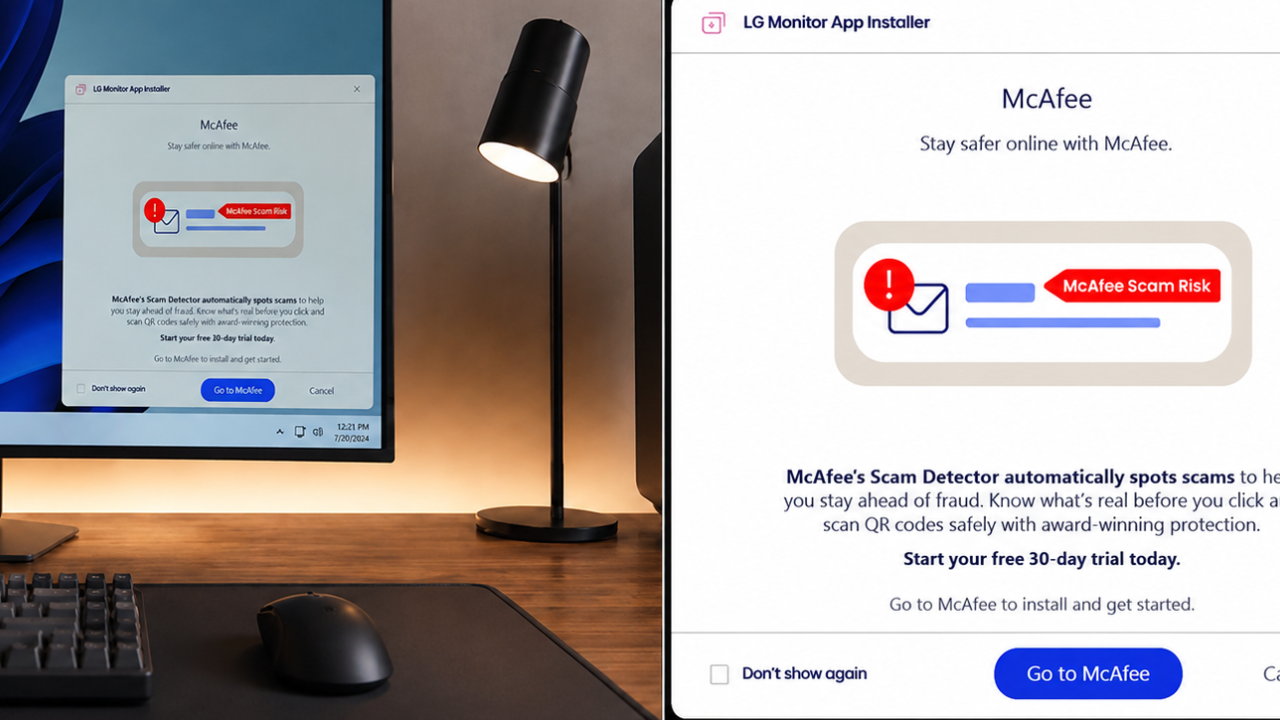
Windows 11 users are complaining after seeing ads for McAfee through the companion app for LG’s monitor. The reports have angered users who had expected the software to take care of only monitors and not to be used for showing advertisements of third party security product.
There were some discussions online that the application tried to push or offer McAfee software during installation or updates. However, there is no evidence that LG Monitor installs McAfee automatically without the user’s consent. For information on the operation of the software, refer to the official LG documentation.
Angry Users As McAfee Promotions Roll On
The LG monitor app allows users to control display settings, firmware updates, screen layouts and other monitor functions. Other users said they saw McAfee promotional messages in the app or during setup, not just hardware-related tools.
Soon reports were all over tech forums and social media, with many users asking why monitor management software would push antivirus products.
Why are users pissed off?
Many customers feel that companion software, for hardware devices, should be ad-free. But with the presence of promotional messages, some users have complained the experience is unnecessary and distracting.
Some users also noted that the alerts felt like critical system notifications, making it difficult to distinguish between legitimate software messages and optional promotional offers.
But the reports in those complaints generally say the ads are promotional and do not indicate that the software was installed without permission.
Understanding the Changes in Software .
Sometimes PC makers include optional third party offers with installation packages or companion apps. These promotions are often linked to commercial partnerships and can encourage users to download more software.
Users should review the screens they see during installation before accepting optional offers. Each prompt you see prevents you from installing software that is not required for the monitor to function correctly.
LG has not alleged that its monitor app installs McAfee without user approval automagically.
If you’re a Windows 11 user, you can:
If you do not want to see the notifications, you can check the notification settings of the app, or uninstall the app if you do not use the monitor utility any more. Just be sure to use it to update firmware or configure the display before uninstalling the software.
Windows users can also view the Installed Apps section to see the programmes they’ve installed on their system. If you have McAfee software on your computer and you didn’t ask for it, you can usually uninstall it using the standard Windows uninstall process.
You can also download the utilities directly from the LG official support website which can help you make sure you are running the most current version of the application.
Debate over partner software heats up
The reports have reignited debate about advertising in hardware utilities. Many users think that software to control monitors, keyboards, printers and other accessories should be more functional than marketing.
Clear installation options, notification controls, and simple descriptions of optional software can go a long way towards improving the overall user experience, while keeping customer trust intact.
LG has not given any further information at this time, but users should check official support for correct information on software updates and apps and how they will function in the future.
Sources
- LG Support – Monitors: Official Software and Firmware Updates, Customer Support Information
- Microsoft Support – Change app notification settings in Windows 11 Microsoft Support
- McAfee Support – Software and Product Information and Installation
- BleepingComputer » Security news and Windows software
- The Register – Biting the hand that feeds IT. Technology news and views from around the globe